Greetings Everyone
I need help and guidance
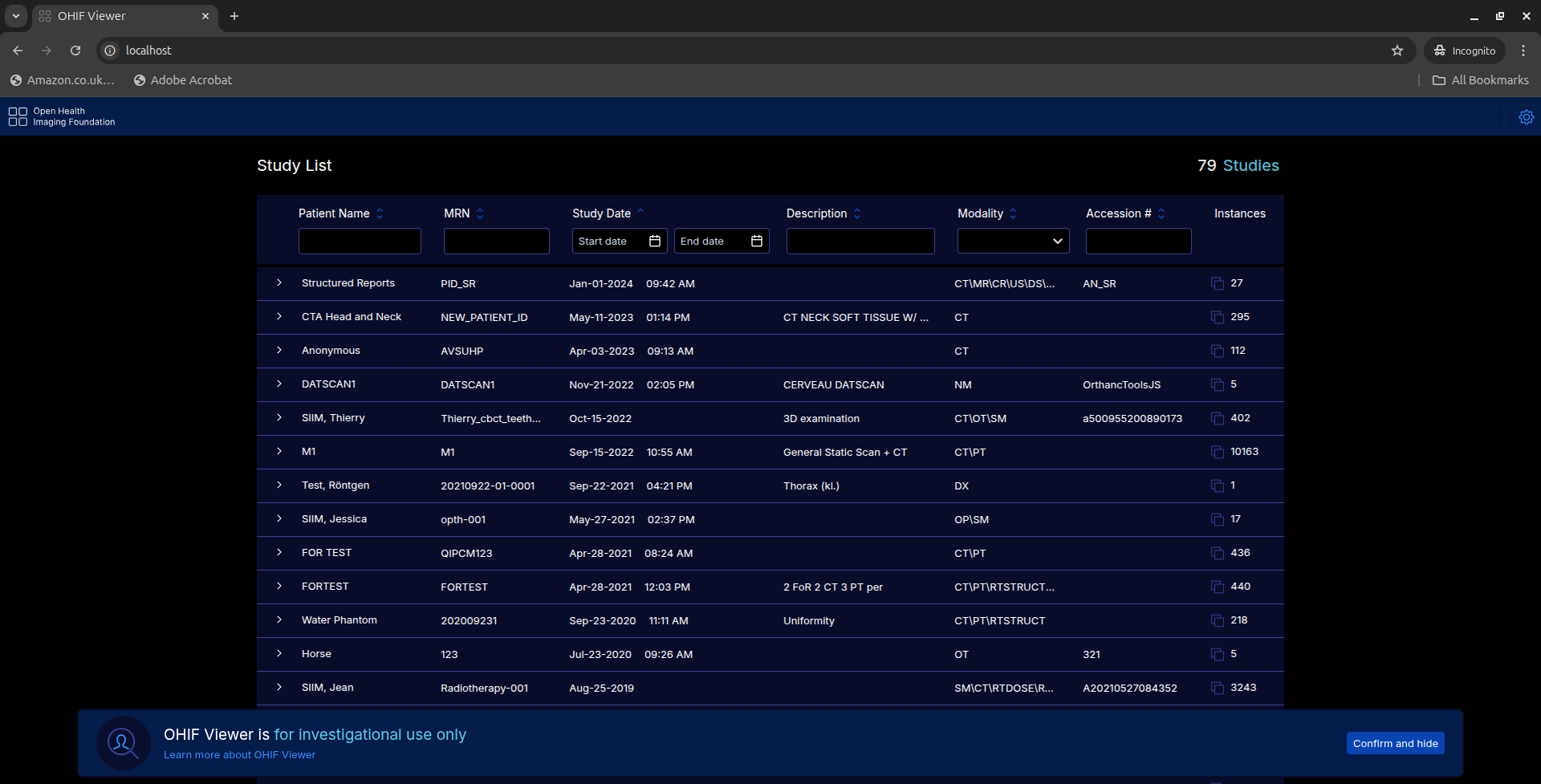
@john @Humberto_Romano @mugwero @Members
I’m currently working on a project
Please have been struggling to completely remove “OHIF Viewer is for investigation use only”
I’m using v3.11.1
Greetings Everyone
I need help and guidance
Please have been struggling to completely remove “OHIF Viewer is for investigation use only”
I’m using v3.11.1
Have you tried setting the config option investigationalUseDialog to value never?
// in platform/app/public/config/default.js (or your selected config file)
export default {
// …existing config…
investigationalUseDialog: {
option: ‘never’,
},
// …rest of config…
};
Content in platform/app/public/config/default.js
/** @type {AppTypes.Config} */
window.config = {
name: ‘config/default.js’,
routerBasename: null,
disableUserConsent: true,
investigationalUseDialog: false,
userConsentPane: {
enabled: false
},
// whiteLabeling: {},
extensions: ,
modes: ,
customizationService: {
defaultWarningMessage: ‘’
},
ui: {
disableWarningMessage: true
},
showStudyList: true,
// some windows systems have issues with more than 3 web workers
maxNumberOfWebWorkers: 3,
// below flag is for performance reasons, but it might not work for all servers
showWarningMessageForCrossOrigin: true,
showCPUFallbackMessage: true,
showLoadingIndicator: true,
experimentalStudyBrowserSort: false,
strictZSpacingForVolumeViewport: true,
groupEnabledModesFirst: true,
allowMultiSelectExport: false,
maxNumRequests: {
interaction: 100,
thumbnail: 75,
// Prefetch number is dependent on the http protocol. For http 2 or
// above, the number of requests can be go a lot higher.
prefetch: 25,
},
showErrorDetails: ‘always’, // ‘always’, ‘dev’, ‘production’
// filterQueryParam: false,
// Defines multi-monitor layouts
multimonitor: [
{
id: ‘split’,
test: ({ multimonitor }) => multimonitor === ‘split’,
screens: [
{
id: ‘ohif0’,
screen: null,
location: {
screen: 0,
width: 0.5,
height: 1,
left: 0,
top: 0,
},
options: ‘location=no,menubar=no,scrollbars=no,status=no,titlebar=no’,
},
{
id: ‘ohif1’,
screen: null,
location: {
width: 0.5,
height: 1,
left: 0.5,
top: 0,
},
options: ‘location=no,menubar=no,scrollbars=no,status=no,titlebar=no’,
},
],
},
{
  id: '2',
  test: ({ multimonitor }) => multimonitor === '2',
  screens: [
    {
      id: 'ohif0',
      screen: 0,
      location: {
        width: 1,
        height: 1,
        left: 0,
        top: 0,
      },
      options: 'fullscreen=yes,location=no,menubar=no,scrollbars=no,status=no,titlebar=no',
    },
    {
      id: 'ohif1',
      screen: 1,
      location: {
        width: 1,
        height: 1,
        left: 0,
        top: 0,
      },
      options: 'fullscreen=yes,location=no,menubar=no,scrollbars=no,status=no,titlebar=no',
    },
  ],
},
],
defaultDataSourceName: ‘dicomweb’,
/* Dynamic config allows user to pass “configUrl” query string this allows to load config without recompiling application. The regex will ensure valid configuration source /
// dangerouslyUseDynamicConfig: {
// enabled: true,
// // regex will ensure valid configuration source and default is /./ which matches any character. To use this, setup your own regex to choose a specific source of configuration only.
// // Example 1, to allow numbers and letters in an absolute or sub-path only.
// // regex: /(0-9A-Za-z.]+)(/[0-9A-Za-z.]+)/
// // Example 2, to restricts to either hosptial.com or othersite.com.
// // regex: /(https://hospital.com(/[0-9A-Za-z.]+))|(https://othersite.com(/[0-9A-Za-z.]+))/
// regex: /./,
// },
dataSources: [
{
namespace: ‘@ohif/extension-default.dataSourcesModule.dicomweb’,
sourceName: ‘dicomweb’,
configuration: {
friendlyName: ‘AWS S3 Static wado server’,
name: ‘aws’,
wadoUriRoot: ‘https://d14fa38qiwhyfd.cloudfront.net/dicomweb’,
qidoRoot: ‘https://d14fa38qiwhyfd.cloudfront.net/dicomweb’,
wadoRoot: ‘https://d14fa38qiwhyfd.cloudfront.net/dicomweb’,
qidoSupportsIncludeField: false,
imageRendering: ‘wadors’,
thumbnailRendering: ‘wadors’,
enableStudyLazyLoad: true,
supportsFuzzyMatching: true,
supportsWildcard: false,
staticWado: true,
singlepart: ‘bulkdata,video’,
// whether the data source should use retrieveBulkData to grab metadata,
// and in case of relative path, what would it be relative to, options
// are in the series level or study level (some servers like series some study)
bulkDataURI: {
enabled: true,
relativeResolution: ‘studies’,
transform: url => url.replace(‘/pixeldata.mp4’, ‘/rendered’),
},
omitQuotationForMultipartRequest: true,
},
},
{
  namespace: '@ohif/extension-default.dataSourcesModule.dicomweb',
  sourceName: 'ohif2',
  configuration: {
    friendlyName: 'AWS S3 Static wado secondary server',
    name: 'aws',
    wadoUriRoot: 'https://dd14fa38qiwhyfd.cloudfront.net/dicomweb',
    qidoRoot: 'https://dd14fa38qiwhyfd.cloudfront.net/dicomweb',
    wadoRoot: 'https://dd14fa38qiwhyfd.cloudfront.net/dicomweb',
    qidoSupportsIncludeField: false,
    supportsReject: false,
    imageRendering: 'wadors',
    thumbnailRendering: 'wadors',
    enableStudyLazyLoad: true,
    supportsFuzzyMatching: false,
    supportsWildcard: true,
    staticWado: true,
    singlepart: 'bulkdata,video',
    // whether the data source should use retrieveBulkData to grab metadata,
    // and in case of relative path, what would it be relative to, options
    // are in the series level or study level (some servers like series some study)
    bulkDataURI: {
      enabled: true,
      relativeResolution: 'studies',
    },
    omitQuotationForMultipartRequest: true,
  },
},
{
  namespace: '@ohif/extension-default.dataSourcesModule.dicomweb',
  sourceName: 'ohif3',
  configuration: {
    friendlyName: 'AWS S3 Static wado secondary server',
    name: 'aws',
    wadoUriRoot: 'https://d3t6nz73ql33tx.cloudfront.net/dicomweb',
    qidoRoot: 'https://d3t6nz73ql33tx.cloudfront.net/dicomweb',
    wadoRoot: 'https://d3t6nz73ql33tx.cloudfront.net/dicomweb',
    qidoSupportsIncludeField: false,
    supportsReject: false,
    imageRendering: 'wadors',
    thumbnailRendering: 'wadors',
    enableStudyLazyLoad: true,
    supportsFuzzyMatching: false,
    supportsWildcard: true,
    staticWado: true,
    singlepart: 'bulkdata,video',
    // whether the data source should use retrieveBulkData to grab metadata,
    // and in case of relative path, what would it be relative to, options
    // are in the series level or study level (some servers like series some study)
    bulkDataURI: {
      enabled: true,
      relativeResolution: 'studies',
    },
    omitQuotationForMultipartRequest: true,
  },
},

{
  namespace: '@ohif/extension-default.dataSourcesModule.dicomweb',
  sourceName: 'local5000',
  configuration: {
    friendlyName: 'Static WADO Local Data',
    name: 'DCM4CHEE',
    qidoRoot: 'http://localhost:5000/dicomweb',
    wadoRoot: 'http://localhost:5000/dicomweb',
    qidoSupportsIncludeField: false,
    supportsReject: true,
    supportsStow: true,
    imageRendering: 'wadors',
    thumbnailRendering: 'wadors',
    enableStudyLazyLoad: true,
    supportsFuzzyMatching: false,
    supportsWildcard: true,
    staticWado: true,
    singlepart: 'video',
    bulkDataURI: {
      enabled: true,
      relativeResolution: 'studies',
    },
  },
},
{
  namespace: '@ohif/extension-default.dataSourcesModule.dicomweb',
  sourceName: 'orthanc',
  configuration: {
    friendlyName: 'local Orthanc DICOMWeb Server',
    name: 'DCM4CHEE',
    wadoUriRoot: 'http://localhost/pacs/dicom-web',
    qidoRoot: 'http://localhost/pacs/dicom-web',
    wadoRoot: 'http://localhost/pacs/dicom-web',
    qidoSupportsIncludeField: true,
    supportsReject: true,
    dicomUploadEnabled: true,
    imageRendering: 'wadors',
    thumbnailRendering: 'wadors',
    enableStudyLazyLoad: true,
    supportsFuzzyMatching: true,
    supportsWildcard: true,
    omitQuotationForMultipartRequest: true,
    bulkDataURI: {
      enabled: true,
      // This is an example config that can be used to fix the retrieve URL
      // where it has the wrong prefix (eg a canned prefix).  It is better to
      // just use the correct prefix out of the box, but that is sometimes hard
      // when URLs go through several systems.
      // Example URLS are:
      // "BulkDataURI" : "http://localhost/dicom-web/studies/1.2.276.0.7230010.3.1.2.2344313775.14992.1458058363.6979/series/1.2.276.0.7230010.3.1.3.1901948703.36080.1484835349.617/instances/1.2.276.0.7230010.3.1.4.1901948703.36080.1484835349.618/bulk/00420011",
      // when running on http://localhost:3003 with no server running on localhost.  This can be corrected to:
      // /orthanc/dicom-web/studies/1.2.276.0.7230010.3.1.2.2344313775.14992.1458058363.6979/series/1.2.276.0.7230010.3.1.3.1901948703.36080.1484835349.617/instances/1.2.276.0.7230010.3.1.4.1901948703.36080.1484835349.618/bulk/00420011
      // which is a valid relative URL, and will result in using the http://localhost:3003/orthanc/.... path
      // startsWith: 'http://localhost/',
      // prefixWith: '/orthanc/',
    },
  },
},

{
  namespace: '@ohif/extension-default.dataSourcesModule.dicomwebproxy',
  sourceName: 'dicomwebproxy',
  configuration: {
    friendlyName: 'dicomweb delegating proxy',
    name: 'dicomwebproxy',
  },
},
{
  namespace: '@ohif/extension-default.dataSourcesModule.dicomjson',
  sourceName: 'dicomjson',
  configuration: {
    friendlyName: 'dicom json',
    name: 'json',
  },
},
{
  namespace: '@ohif/extension-default.dataSourcesModule.dicomlocal',
  sourceName: 'dicomlocal',
  configuration: {
    friendlyName: 'dicom local',
  },
},
],
httpErrorHandler: error => {
// This is 429 when rejected from the public idc sandbox too often.
console.warn(error.status);
// Could use services manager here to bring up a dialog/modal if needed.
console.warn('test, navigate to https://ohif.org/');
},
// segmentation: {
// segmentLabel: {
// enabledByDefault: true,
// labelColor: [255, 255, 0, 1], // must be an array
// hoverTimeout: 1,
// background: ‘rgba(100, 100, 100, 0.5)’, // can be any valid css color
// },
// },
// whiteLabeling: {
// createLogoComponentFn: function (React) {
// return React.createElement(
// ‘a’,
// {
// target: ‘_self’,
// rel: ‘noopener noreferrer’,
// className: ‘text-purple-600 line-through’,
// href: ‘X___IDC__LOGO__LINK___Y’,
// },
// React.createElement(‘img’, {
// src: ‘./Logo.svg’,
// className: ‘w-14 h-14’,
// })
// );
// },
// },
};
Thank Sir for your response
Please can you a video on that?