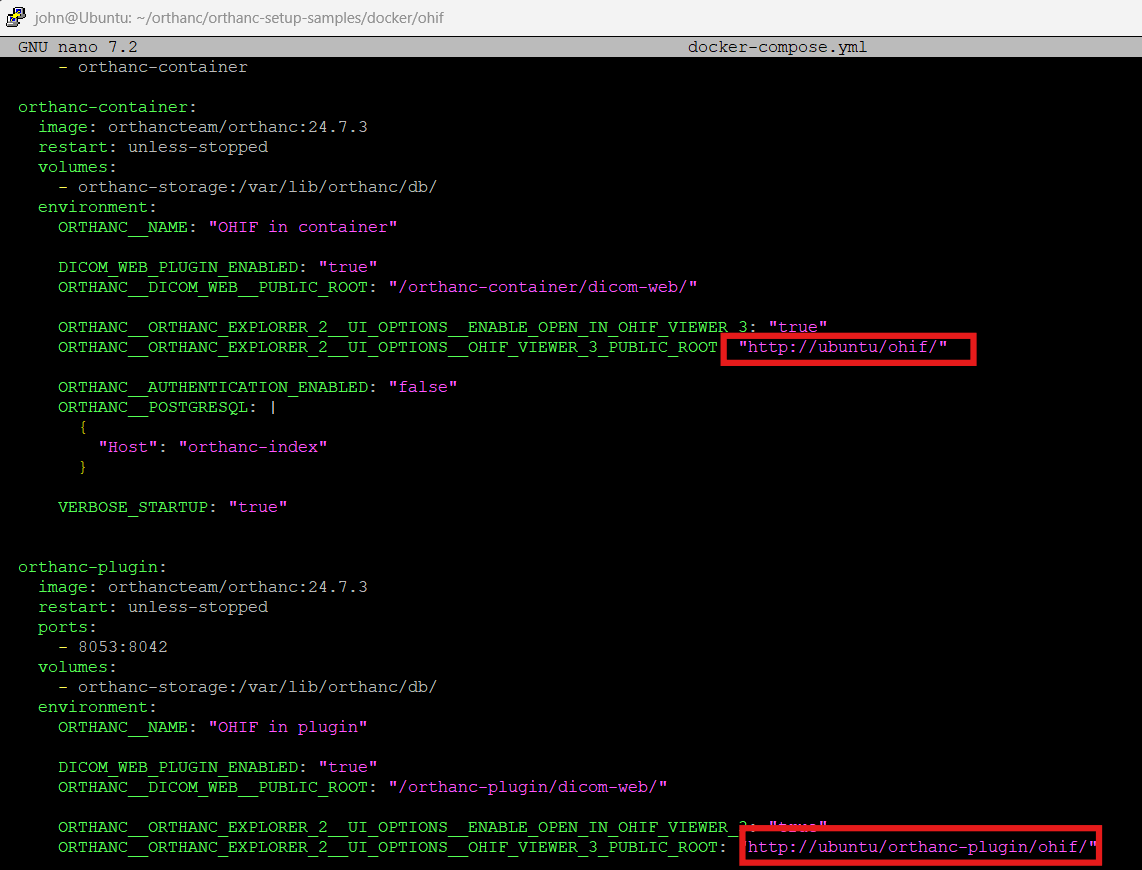
Fix the URLs pointing to OHIF if you are not running the browser locally
nano docker-compose.yml
Run docker compose
sudo docker compose up --build
The above will take a moment since it’s pulling the images and it’s also building the ohif image as instructed by the docker-compose.yml
This sample package is actually starting two orthanc instances: one with the ohif plugin running ohif inside the orthanc docker container and another orthanc instance which is integrated with an external ohif docker container.
Great video
I am comfortable in linux and docker
I already self host things
I was interested in changing from my proprietary 2020 imaging system platform to open source software can would orthanc be the solution
have deployed OHIF from Orthanc setup sample with docker and portainer. All the container running successful and viewer open successful by upload dicom fron explorer 2.
Now unable to find Orthanc config json to edit patient count or size (to Store), add modality node options to send dicom images from remote modalities.
Welcome to the community. Good to hear you’re comfortable with Linux & Docker — that will definitely help when considering transitioning your imaging platform. Are you working as a suplier of the imaging platform for customers or using it for your own clinic?
a) The Docker Hub image: orthancteam/orthanc
This is a pre-built Docker container image maintained by the “Orthanc Team” (or commercial partner) for deployment.
b) The GitHub repositories (under orthanc-server)
These are the source code / build scripts / plugin code / sample configurations.